


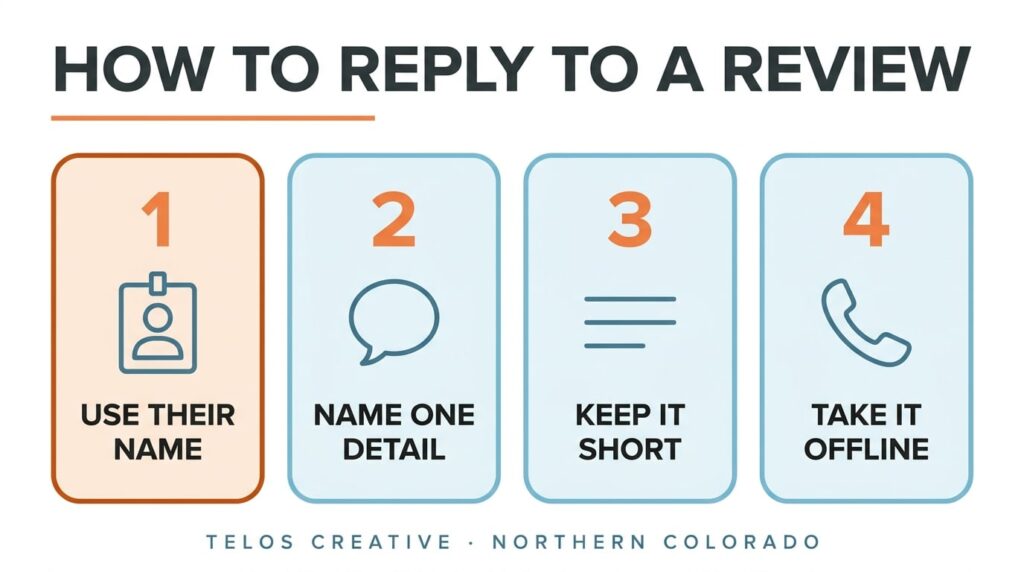
To respond to a Google review, open your Business Profile, choose Read reviews, then Reply. Thank the person by name, mention one thing they said, and keep it to two to four sentences. For a bad review, apologize where it fits and offer to sort it out by phone. We manage reviews for Northern Colorado businesses at Telos Creative in Windsor.
Below is the routine we follow on the listings we look after, with Google’s own rules and the 2026 figures on what customers expect. The examples use a landscaping company, but the same replies work for any local business.
How Do You Reply To A Google Review?
Sign in with the Google account that manages your listing. Then, following Google’s own steps:
- Go to your Business Profile. Searching your business name on Google brings it up.
- Select Read reviews.
- Next to the review, select Reply.
- Type your reply.
- Select Reply again to post it.
Three things happen next. The reviewer gets a notification that you replied. Google checks the reply against its content policies before it appears, which usually takes up to 10 minutes and can take up to 30 days. And you can edit or delete the reply later from the same place.
Put it on the calendar. Checking reviews twice a week, say Monday and Thursday, means no review waits more than four days for a reply.
Should You Reply To Every Google Review?
Reply to every new one. In BrightLocal’s 2026 survey of 1,002 US consumers, 89% said they expect owners to respond to reviews. 80% said they were more likely to use a business that replies to all of its reviews, and 42% said they were unlikely to use one that ignores its reviews entirely.
Picking and choosing did much worse. Only 45% were likely to use a business that replies just to positive reviews, and 47% one that replies just to negative ones. Google’s own tips for review replies add that a reply counts most where you can share a helpful update or answer a question, so put the effort there and keep the rest short.
What about old reviews nobody answered?
We leave them. A reply to a review from two years ago reaches a customer who has moved on, and to everyone else it reads as automated. Start with the next review that comes in and keep up from there.
How Quickly Should You Reply To A Google Review?
Within a few days, and inside a week at the latest. In the same BrightLocal survey, 81% of consumers expected a response within a week, 32% by the following day and 19% the same day. The share wanting a reply by the next day was 18% the year before, so the expectation is rising.
Google’s tips make the same point in plainer words: a prompt response shows you value the feedback. For a small business, a routine does the job: two fixed times a week is enough to stay inside what most customers expect.
How Do You Respond To A Positive Google Review?
Use their name, mention the specific thing they praised, thank them, and stop. Google’s tips say to keep replies short and simple, and conversational rather than promotional. The reviewer is already a customer, so a reply is no place for a discount or a sales line.
An example
The review (5 stars): “Maria and her crew rebuilt our backyard patio in three days and left the yard cleaner than they found it.”
The reply: “Thank you, Dana. Three days was the plan, and we’re glad the cleanup stood out, because the crew takes pride in it. Enjoy the new patio this spring. Maria”
The reply picks up the detail the customer chose to mention and is signed by a person. Naming the job in plain words also tells the next reader what you do.
Why not use a template?
Because readers can tell. In BrightLocal’s survey, templated or generic replies made 50% of consumers unlikely to choose the business. A reply that repeats a detail from the review shows a person read it. If you use AI to draft replies, edit each one so it says something only you could say.
How Do You Respond To A Negative Google Review?
Calmly and once, in a few sentences. Google’s tips for negative reviews come down to five things:
- Never share the reviewer’s private information, and never make it personal.
- Admit a mistake if you made one, without taking the blame for things outside your control.
- Apologize where it is deserved, and show you understand how the customer feels.
- Use their name and answer what they actually said.
- Ask them to call or email so you can sort it out privately.
An example
The review (2 stars): “Two weeks late starting, and nobody called to tell us.”
The reply: “Sam, you’re right that we should have called when the start date moved, and I’m sorry we didn’t. Please call me at the office so I can hear what happened and put it right. Maria”
It agrees with the part that is fair, apologizes for that part only and moves the conversation to the phone, which keeps the scheduling details off the public page.
Wait an hour before you post it
Write the reply, then leave it for an hour. Anything defensive stays there for every future customer to read, long after the job itself is forgotten.
There is a legal limit too. The Federal Trade Commission’s rule on fake reviews, announced in August 2024, bars businesses from using threats or intimidation to prevent or remove a negative review, and that includes unfounded legal threats.
What If A Review Is Fake Or Not From A Customer?
Report it, and keep any reply short. In Google’s Reviews Management Tool, select Report next to the review, choose the reason and submit. Google says anyone can report a review, but it removes only reviews that break its policies, not reviews a business disagrees with.
The same tool shows where each report stands: decision pending, reviewed with no policy violation found, or escalated. If Google finds no violation, you get one appeal, and an appeal can cover up to 10 reviews at a time.
If you reply while you wait, state the fact and accuse nobody: “We can’t find a job under this name. If we’ve worked for you, please call us so we can look into it.”
Does Replying To Reviews Help You Rank On Google?
Google lists it in its own tips for local ranking, saying that positive reviews and helpful replies can help a business stand out. It does not say how much. Its local results rest on three things: relevance, distance and prominence, meaning how well-known the business is. Reviews sit alongside the rest of local search, the listing, the website and links, which is the work in our local SEO services.
The surer payoff is the people reading. Someone comparing three businesses on a phone sees your replies right under the reviews, and a calm answer to a bad one can say more about you than another five-star rating. Replies are one part of a listing that brings in calls. The rest, from services and photos to weekly posts, is what we cover in Google Business Profile management.
What Should You Never Do With Google Reviews?
Most of these come from Google’s review policy, and breaking them can cost you the reviews themselves.
- Offer anything in return for a review: payment, a discount, free goods or a free service.
- Ask only your happiest customers. Google calls this selectively soliciting positive reviews.
- Tell customers what to write. Google’s policy says businesses should not ask for specific content in a review.
- Discourage or forbid negative reviews.
- Review your own business, or have staff or family do it. Google treats that as a conflict of interest, and the FTC rule covers undisclosed reviews from insiders too.
- Argue in public, or paste the same reply under every review.
Asking for reviews is allowed and worth doing. Send every customer the same plain request with your review link, and leave what they write to them. For trades, we cover how reviews fit with the rest of the listing in SEO for contractors in Loveland.
Questions We Get Asked About Google Reviews
Can you delete a bad Google review?
No. Only the person who wrote a review can delete it. A business can report a review in Google’s Reviews Management Tool, and Google removes it only if it breaks Google’s policies. A review that is simply unfair or unhappy stays up, which is why a calm reply matters.
Can you edit or delete your reply to a Google review?
Yes. Open Read reviews on your Business Profile, find your reply and choose Edit or Delete. Google checks replies against its content policies before they appear, so an edited reply can take a little while to show.
Does the reviewer see my reply?
Yes. Google notifies the person who wrote the review when you reply, and the reply shows publicly under the review for everyone who reads it later.
Should I reply to a review that is only a star rating?
Yes, briefly. There is nothing specific to answer, so one sentence that thanks the person by name is enough. It still shows the next reader that someone looks after the listing.
Can I use AI to write my review replies?
As a first draft, yes. Edit every reply before you post it so it mentions something the reviewer actually said. In BrightLocal’s 2026 survey, generic or templated replies made half of consumers unlikely to choose the business.
Who should reply to Google reviews?
The owner, or the person the customer dealt with, signed with a first name. Customers are deciding whether to trust real people with their home or their money, and a named reply from someone who was there reads like it.
Want to see how your Google listing looks to a customer right now? Run our free website audit, which checks your Google listing as well as your site, or get in touch and we’ll go through your reviews with you. More on getting found locally: marketing in Fort Collins and AI visibility for local businesses. Arnold Jakobsen founded Telos Creative and is a StoryBrand Certified Guide.