


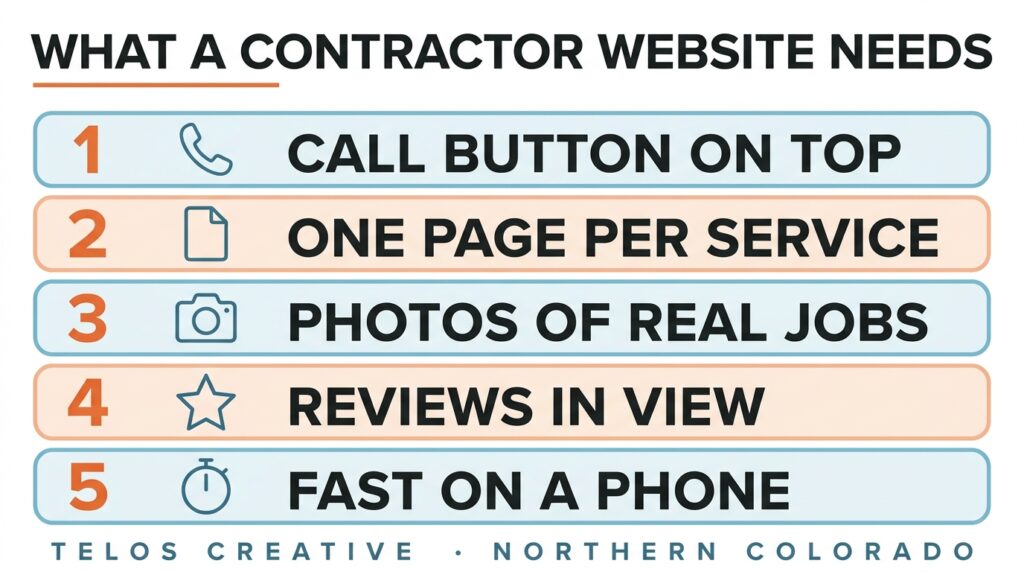
A contractor website has one job: turn a person searching on their phone into a phone call. That means a call button on every page, a page for each service, photos of real finished jobs, reviews in plain view and fast loading on a phone. We design these sites for trades at Telos Creative in Windsor, Colorado.
The examples below use a landscaping company, but the same rules hold for any trade that works at the customer’s property.
What Does A Contractor Website Actually Need To Do?
Most people find a contractor on a phone, often while standing in front of the problem. They want to know three things quickly: do you do this, do you work where I live, and can I trust you. Everything on the site should answer one of those or lead to the call.
Make calling the easiest thing on the page
Put the phone number at the top of every page and make it dial when tapped. Repeat a clear button after each section. If a visitor has to hunt for how to reach you, many will go back to the search results instead.
Say what you do and where, in the first screen
“Landscape design and installation in Loveland and Fort Collins” tells a visitor more than a slogan does. Name the service and the towns before anything else.
Show proof before asking for anything
Photos of finished jobs and a few reviews near the top do more persuading than any amount of copy about quality and craftsmanship.
What Should The Top Of A Contractor Home Page Show?
The first screen on a phone is the most valuable space you have, and on most contractor sites it is spent on a large photo and a slogan. Use it for five things instead.
What you do and where. One plain line, with the main service and the towns.
A call button. Tappable, in a contrasting color, labeled with the action (“Call for a quote”) rather than “Contact”.
A second, quieter option. A short form or a quote request for people who cannot talk right now.
One line of proof. Your Google rating and review count, years in business or the number of jobs completed, whichever is true and strongest.
A real photo. Your crew’s finished work, not a stock image of a smiling homeowner.
Below that, the home page should link to every service page, show a handful of recent projects and repeat the call button. Think of it as a signpost. The detail belongs on the service pages.
Why Should Every Service Have Its Own Page?
Because people search for the job. Someone who wants a new patio types patio installation. They are not hunting for a landscaping company that happens to mention patios halfway down its home page.
Google decides local results partly on relevance, meaning how well what you offer matches the search. A page that is entirely about patios, with the towns you build them in, matches better than a list. Each service page should say what the job involves, roughly how long it takes, what affects the cost and what the customer needs to decide, then show photos of that kind of job.
The other half of being found is your Google Business Profile, reviews and service area. We cover those in SEO for contractors in Loveland.
What Photos Should A Contractor Put On Their Website?
Your own, as many as you can, of real finished work. Before and after pairs are the most persuasive, because they show the size of the change rather than asking the customer to imagine it.
A line under each project
What the job was, which town it was in and roughly how long it took. That one line turns a nice picture into evidence, and it gives the page words that match how people search.
Keep them light
Photos straight off a phone are often several megabytes each. Resize and compress them before they go on the site, or the page that shows your best work will be the slowest one to load. Google’s own image guidance also asks for descriptive file names and alt text, which help the photos appear in image search.
Ask before you photograph a customer’s home
Most customers are happy to say yes when asked, especially if you leave out anything that identifies the address. Asking also tends to start the conversation that ends in a review.
How Fast Does A Contractor Website Need To Load?
Fast enough that the main content appears within about two and a half seconds on a phone. That is the threshold Google’s own guidance on Largest Contentful Paint describes as good, and Google measures it on real visitors’ phones, which are a lot slower than the office Wi-Fi most owners test on.
The usual culprits on contractor sites are oversized photos, an autoplaying video at the top of the page and a pile of add-ons that each load their own code. You can check your own site for free with our free audit, which includes a speed check.
Should A Contractor Website List The Towns It Serves?
Yes, plainly and in one place, and the list should match the service area on your Google Business Profile. A visitor in Windsor wants to see Windsor before they call, and a consistent list across your site and your profile is one more signal that you are the business you say you are.
Be careful with separate pages for every town. A page for a town is worth writing when you have something real to say about working there: projects you have done, local permits, the conditions you deal with. A set of pages that only swap the town name helps nobody, and Google’s guidance on helpful content is clear that pages made mainly to rank, rather than to help a reader, are not what it wants to show.
How Do You Know If Your Website Brings In Work?
By counting it. Taps on the phone number and form submissions can both be recorded in Google Analytics and marked as key events, so you can see how many came from search, from your Google profile and from everywhere else.
Check it against your own inbox and call log every so often. Tracking breaks quietly, spam fills forms, and a website that seems to be doing nothing is sometimes doing fine with nobody counting. If you want to see what a site built this way looks like, our project work and StoryBrand website examples show the structure. For budgeting, we explain how much a website costs and what changes the price.
Questions Contractors Ask About Their Websites
Do I need a website if most of my work comes from referrals?
Yes, because referrals check you out before they call. Someone given your name by a neighbor will search for it, look at your photos and read your reviews. A clear website confirms the recommendation. No website, or an outdated one, makes them wonder whether you are still trading.
Should I put prices on my contractor website?
Some guidance beats silence. Exact prices are rarely possible, but a typical range, what moves it up or down and what a normal project looks like will keep people on the page who would otherwise leave to find someone who told them something.
How many pages does a contractor website need?
A home page, one page for each service you want to be hired for, a page of finished projects, an about page and a contact page. A landscaping company might have eight to twelve pages in total. Add more only when each one has a job of its own.
Can I use stock photos or manufacturer photos?
Use your own wherever you can. Customers are deciding whether to trust you with their property, and photos of your finished jobs are the strongest evidence you have. Stock photos are easy to spot and say nothing about your work. Photos taken on your own phone are fine.
Should my home address be on the website?
Not if you work from home and go to customers. List your phone number, the towns you serve and your hours instead, and keep those details identical to your Google Business Profile, where Google also allows a service area business to hide its address.
Is a template website good enough for a contractor?
A template can work if it is fast on a phone, puts the call button at the top and gives every service its own page. Many templates do none of those by default. The template matters less than whether someone has set it up around how your customers actually search and call.
Want to know how your site does on a phone right now? Run the free audit, or get in touch and we’ll come out to the job site if that’s easier. More on how we build sites: our web design service, web design in Fort Collins and website design in Loveland. Related reading: AI visibility for local businesses. Arnold Jakobsen founded Telos Creative and is a StoryBrand Certified Guide.